PREP-STEP 1: Retrieve Installers
Execute the following procedures to retrieve the necessary host agent installers, config files, and keys necessary for whatever you are trying to deploy.
Retrieve the Endgame Sensor API Key
These procedures assume that a Sensor Profile has been created per 262COS-EG-SOP-001 - Endgame Sensor Setup.
Procedures
- Login with an
adminaccount to https://endgame - Navigate to
Administration -> SENSOR - Copy the
API KEY– this value will later be stored in the$EndgameAPIKeyPowerShell variable for Endgame deployment - Continue to OPTION B if you wish to deploy the outdated agent's provided by the PMO
OTHERWISE - ClickDownload Profileto download the Endgame agent bundle and continue to OPTION A to retrieve the updated agents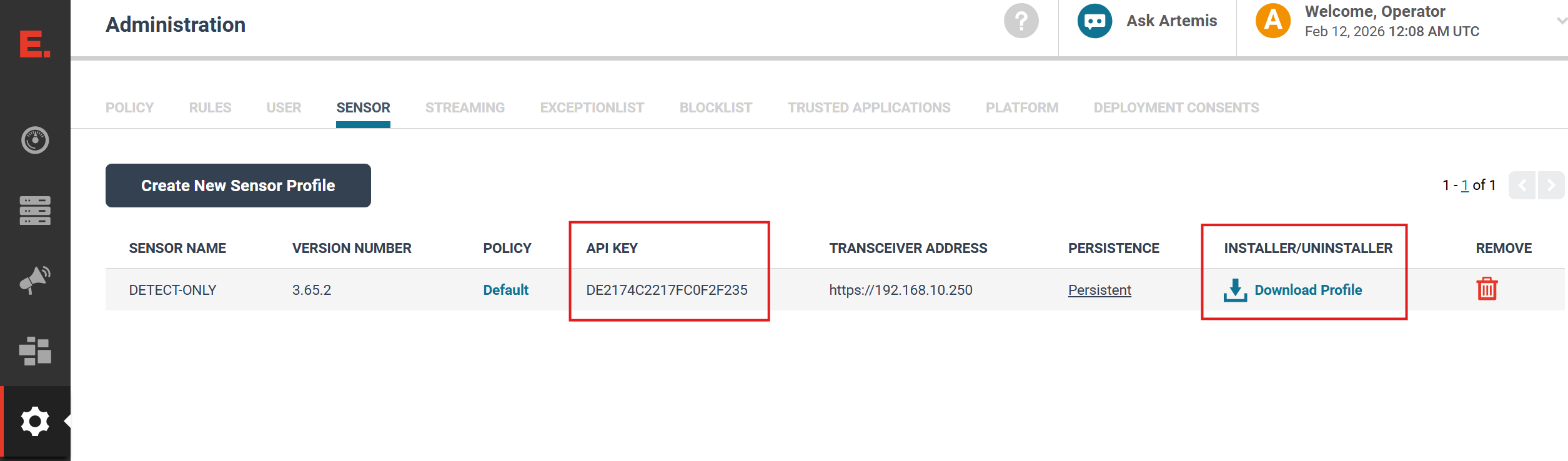
OPTION A: Retrieve Updated Agents (RECOMMENDED)
On CVA/H DIPs configured IAW 262COS-DIP-SOP-001 - CVAH DIP Setup with the Fleet_Server package installed, and the included Elastic-artifact-server Helm chart installed from the TFPlenum Catalog - the following up-to-date host agent installers can be retireved directly from the Controller (http://controller/agent_pkgs/)
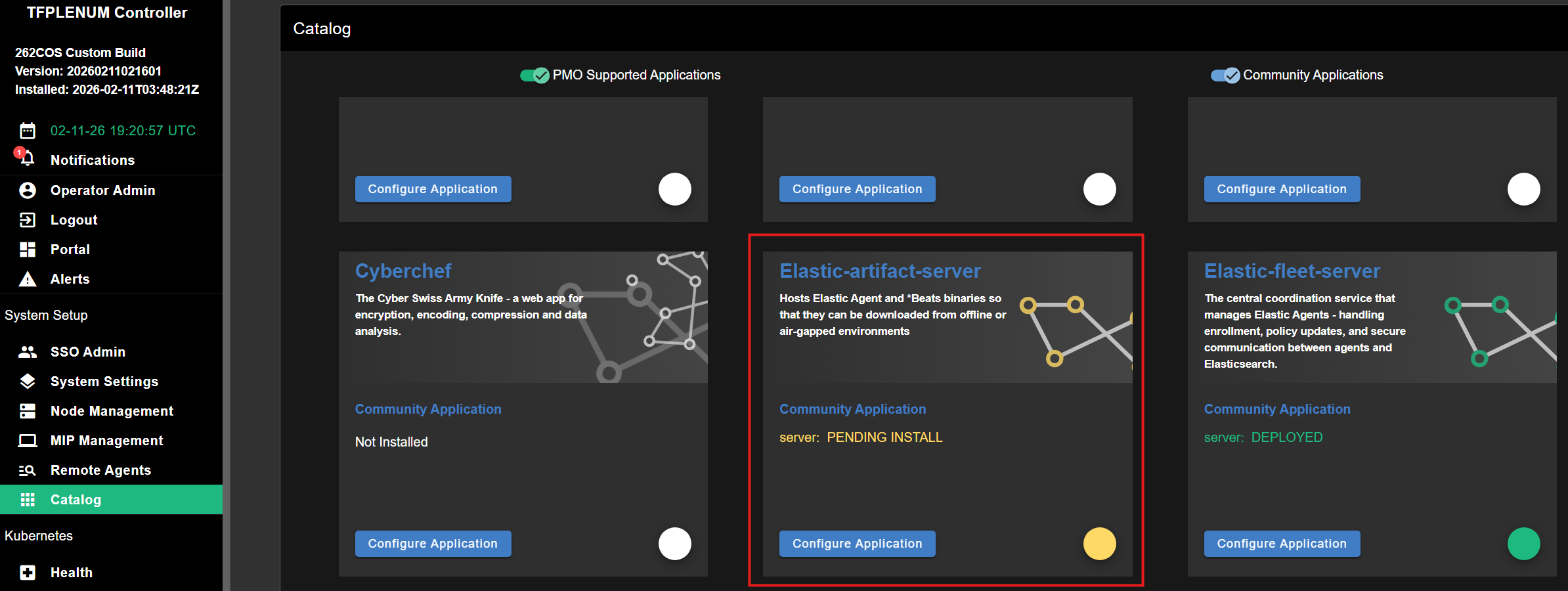
The following agents are made available for download on the Controller (http://controller/agent_pkgs/):
| Installers | EXE | MSI | ELF | RPM | DEB | Deploy-Agent.psm1 compatible |
|---|---|---|---|---|---|---|
| Auditbeat | ✅ | ❌ | ✅ | ✅ | ✅ | ✅ Can Install |
| Filebeat | ✅ | ❌ | ✅ | ✅ | ✅ | ✅ Can Install |
| Winlogbeat | ✅ | ❌ | ❌ | ❌ | ❌ | ✅ Can Install |
| Metricbeat | ✅ | ❌ | ✅ | ✅ | ✅ | ❌ Manual install |
| OSQuerybeat | ✅ | ❌ | ✅ | ❌ | ❌ | ❌ Manual install |
| Packetbeat | ✅ | ❌ | ✅ | ✅ | ✅ | ❌ Manual install |
| Elastic Agent | ✅ | ✅ | ✅ | ✅ | ✅ | ❌ Manual install |
| Sysmon | ✅ | ❌ | ❌ | ❌ | ❌ | ✅ Can Install |
Procedures
- Navigate to the HTTP page hosted on the controller Controller (
http://controller/agent_pkgs/) - Download each agent installer and config template that you need for your deployment
- Copy the installers to the Fileserver's SMB Share under
/MISSION/03_EXECUTION/07_STAGING/HOST_AGENTS/
OPTION B: Retrieve PMO Provided Agents
Retrieve Windows Installers (Endgame, Sysmon, Winlogbeat)
On "vanilla" CVA/H DIPs the following OUTDATED *Beats agents (v7.16.3 as of CVA/H 3.8.3) are made available for between the PMO AppStore and TFPlenum agent deployer:
| Installers | EXE | MSI | ELF | RPM | DEB | Deploy-Agent.psm1 compatible |
|---|---|---|---|---|---|---|
| Auditbeat | ✅ | ❌ | ✅ | ✅ | ❌ | ✅ Can Install |
| Filebeat | ✅ | ❌ | ✅ | ✅ | ❌ | ✅ Can Install |
| Winlogbeat | ✅ | ❌ | ❌ | ❌ | ❌ | ✅ Can Install |
| Metricbeat | ✅ | ❌ | ✅ | ✅ | ❌ | ❌ Manual install |
| Packetbeat | ✅ | ❌ | ✅ | ✅ | ❌ | ❌ Manual install |
| Sysmon | ✅ | ❌ | ❌ | ❌ | ❌ | ✅ Can Install |
If needed, another installer package can be created for Filebeat and Auditbeat - but these specific agents need to have their configurations tuned
Procedures
- Login to TFPlenum at
https://controller.<KIT_DOMAIN> - Navigate to
Remote Agents - Click
Add Installer Configand fill the following:Setting Value Configuration Name Endgame+Sysmon+WinlogbeatApplications 🗹 Install Endgame Agent🗹 Install Sysmon🗹 Install WinlogbeatConnect to Endgame Server: Endgame Server IP: 10.<X>.<Y+2>.200
Endgame Server Username:admin
Endgame Server Password:<ENDGAME_PASSWORD>
Endgame Server Port:443Select Endgame Agent: Sensor Profile: PERSISTENT(SelectDISSOLVABLEif directed by MEL/MP)Options for Winlogbeat: Traffic Destination: <DIP_EXTERNAL_IP>
Traffic Destination Port:5045 - Select the radio button for the
Endgame+Sysmon+Winlogbeatpackage and clickDownload Installer - Copy the installer package to the Fileserver's SMB Share under
/MISSION/03_EXECUTION/07_STAGING/HOST_AGENTS/
Retrieve Linux Installers (Filebeat, Auditbeat, Metricbeat)
Some Linux installers (non-DEB) can be found on the PMO provided CVA/H external drive's Appstore (or the Fileserver's SMB AppStore share under /Elastic Stack/Elastic Beats Products/) – or they can all be directly downloaded from https://www.elastic.co/downloads/beats/
Copy the installers to the Fileserver's SMB Share under /MISSION/03_EXECUTION/07_STAGING/HOST_AGENTS/